

The Coohom 3D Floor Planner sits at the center of a cloud-based interior design platform that combines layout drawing, furnishing, material editing and rendering in one browser workspace. Coohom describes a user base of more than four million people, including professional designers, furniture retailers, remodeling contractors and home owners planning their own projects. The Floor Planner is the module most visitors meet first, because later stages such as photorealistic images and panoramic walkthroughs depend on a room that has already been drawn and populated. This review looks at how the Coohom 3D Floor Planner is built, what it demands in skill and hardware, how its output compares with reasonable expectations, and where recent pricing changes complicate the value case. Several public figures about the platform are inconsistent or changed during 2026, so the analysis separates what is documented consistently from what should be confirmed on the current pricing page before any purchase decision.
Coohom and the Background of Its Floor Planning Tool
Coohom introduced its 3D Floor Planner to the wider trade press in 2022, when coverage described a feature aimed at both business owners and interior designers who found conventional design software slow. At that time the company cited more than 750,000 models, about 3,000 furnished floor plans produced by an AI decorator, and rendering at resolutions as high as 16K. The current app store listing speaks instead of roughly 300,000 available models, drawn partly from a curated library of more than 20,000 assets plus whatever users upload. These numbers are not necessarily contradictory, since catalogs get reorganized and counting methods differ, but they show why headline statistics from Coohom should be read with care. What remains consistent across the years is the underlying idea: a visual planner that lets a non-engineer move from an empty footprint to a furnished, rendered room without learning a conventional CAD environment, while still offering enough control for client-facing presentation work.
Coohom Interface and Design Workflow
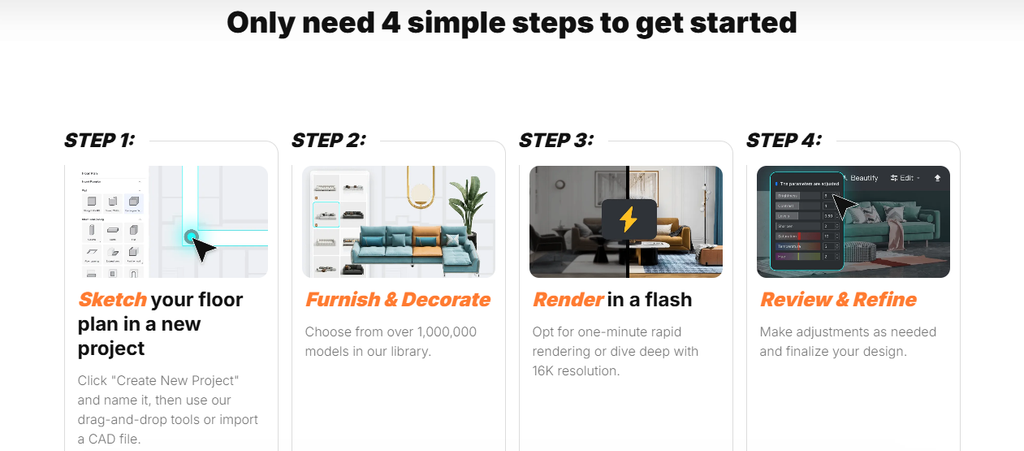
Using the Coohom 3D Floor Planner follows a logical sequence. Walls are drawn at real-world dimensions with grid snapping, doors and windows are placed on those walls, and furniture is dragged in from the catalog while the layout updates in both two and three dimensions. Independent reviewers describe the entire process as living inside a single browser tab, which removes the file hand-offs that usually separate drafting, modeling and rendering tools. The approach suits beginners more than traditional CAD does, yet it keeps the precision a designer needs to avoid obvious scale errors. One practical caveat appears repeatedly in assessments: the modeling workflow is built around a desktop and a mouse. An iOS application exists, and it is useful for reviewing or presenting a project, but detailed editing on a phone screen is awkward. Users with modest hardware should also expect the quality of the experience to depend on browser performance and connection speed, because most of the processing happens in the cloud.
Coohom Model Library and Customization Depth

A planner is only as persuasive as the objects that fill it, and the content library is where the Coohom 3D Floor Planner invests heavily. The catalog covers furniture, lighting, flooring, doors, windows, wardrobes, kitchen cabinets and decorative items, and a portion of it is tied to real manufacturer products that a designer can specify or a shopper can eventually buy. Customization is handled through texture, color and style editors, along with lighting adjustments that influence how the final render looks. Teams with their own assets can upload models created in 3ds Max or SketchUp to assemble a private library, which matters for retailers and manufacturers who want a showroom-accurate presentation rather than generic stand-ins. The AI decorator adds another layer by proposing furnished layouts as starting points, which can shorten the blank-canvas stage of a project.
Coohom Rendering Quality and Output Formats
Output is where the Coohom 3D Floor Planner converts effort into something a client can judge. The platform produces photorealistic still images, with 4K frequently mentioned by users, along with 360-degree panoramas and virtual walkthroughs that can be generated with little manual setup. Rendering runs on remote servers, so a laptop is not tied up during the process, and turnaround is commonly described as measured in minutes. The more notable development concerns limits. Pricing-tracking records show that in July 2026 Coohom capped 1080p video renders on the Pro tier at four per month, and placed monthly ceilings on 8K image renders and 1080p videos on the Elite tier, where both had previously been unlimited. Enterprise customers were reported as unaffected. For a freelancer producing a handful of client presentations, such caps may pose no problem, but studios that iterate heavily on video walkthroughs could reach them quickly and should budget accordingly.
Coohom Pricing and Plan Structure
Pricing for the Coohom 3D Floor Planner has been unusually unstable in 2026, so figures need to be treated as a snapshot. Tracking services recorded a Pro plan at about $29 per month and an Elite plan at about $69 per seat per month, with annual options near $300 and $699, and a seven-day trial on Pro for a short period in June. One analysis found that the advertised annual saving of 17 percent works out closer to 14 and 16 percent on the two plans. Later records indicate that the pricing page switched to wording about a one-time pass without showing a dollar amount, while older marketplace listings still carry entry prices of $9.90 monthly and $89 yearly. A free version is also listed on review sites. User feedback adds a cautionary note, as one reviewer on Trustpilot complained that exporting finished work required a further upgrade after paying for Pro. Prospective buyers should confirm export rights, render allowances and seat counts directly with Coohom before committing.
Coohom Audience and Practical Applications
The audience for the Coohom 3D Floor Planner is broad but not unlimited. Freelance interior designers benefit from the speed of moving from concept to presentable imagery, and furniture or cabinetry retailers can use the manufacturer-linked catalog to show customers a configured room before an order is placed. Real estate marketers and home stagers can generate furnished visuals for empty properties, while students and home owners gain a gentler introduction to spatial planning than professional drafting software provides. Review platforms categorize the tool for residential work, sales and marketing, and design, which matches that spread. It is a weaker fit for architects who need construction documentation, structural detail or strict engineering tolerances, since the platform is built around visualization rather than building-code workflows.
Coohom Market Position Against Alternatives
Within the crowded category of home design software, Coohom occupies a middle position between consumer room planners and professional visualization suites. Planner 5D is often cited as the closest relative, with friendlier onboarding and broader mobile support, while Homestyler appeals to hobbyists who want a large free library. SketchUp and AutoCAD offer deeper modeling and drafting control, though at the expense of a steeper learning curve, and newer AI-first tools that reimagine a photographed room skip manual layout entirely. Against that backdrop, the Coohom 3D Floor Planner stands out for covering the whole sequence of planning, furnishing and rendering with a catalog tied to real products.Buyers who value an integrated pipeline and client-ready visuals will find it competitive, while those who prioritize predictable pricing or engineering-grade drawings may be better served elsewhere.